
Delta is considered one of the top Roblox Executors available for iOS devices, including both iPhone and iPad. However, just like with any other executor used for running Roblox scripts, users can sometimes run into errors.
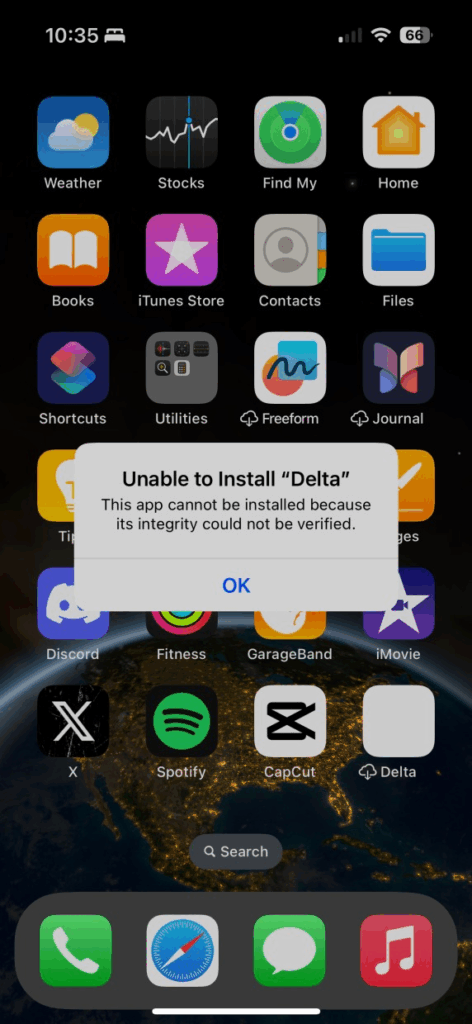
One of the most common issues with Delta iOS Executor is the error message:
“Unable to install ‘Delta.’ This app cannot be installed because its integrity could not be verified.”
If you’ve come across this problem, you’re not alone. Many iOS users encounter the same issue but aren’t sure what causes it or how to fix it. Don’t worry—we’ll walk you through the reasons behind this error and explain step-by-step how to solve it.
Why Does the “Unable to Install Delta” Error Happen?
There are usually two main causes for this error on iPhone or iPad:
-
Expired Certificate – If the ESign, Scarlet, or any other signing certificate you used has expired, the app won’t install.
-
Device Blacklisting – In some cases, your device may get blacklisted, which prevents the app from being installed.
How to Fix the “Unable to Install Delta Executor” Error on iOS
1. Update or Replace the Certificate
The first step is to check your signing certificate. If you’re using ESign, an expired certificate is the most likely reason behind the error.
-
Remove the old, invalid certificate.
-
Visit the official ESign website (esign-ios.com) and download the latest valid certificate.
-
Add the updated certificate to the ESign app.
-
Try reinstalling Delta Executor.
⚠️ Important: Always download certificates from trusted official sources. Avoid random sites, as they may contain malware.
The same method applies if you are using Scarlet, Feather, or any other IPA signing app.
2. Reset Your Device
If updating the certificate doesn’t fix the issue, the next step is to reset your iPhone or iPad. This should be your last option, as it will erase all of your data.
The reason this works is that resetting your device removes it from any blacklist that may be preventing Delta or ESign from installing.
After the reset:
-
Reinstall the ESign app
-
Download the latest Delta IPA file
-
Follow the installation steps again to check if the error has been resolved.
Final Thoughts
The “Unable to Install Delta” error on iOS usually comes down to either an expired certificate or a blacklisted device. By updating your signing certificate or performing a factory reset, you should be able to get Delta Executor running again on your iPhone or iPad.
1 thought on “Delta iOS Installation Error: How to Fix ‘Unable to Install’ issue (August 2025)”